
The workflow
Prepare a dated PDF, then inspect and print it.
- Open your local iPhone backup in MessageHarvest on a supported Mac.
- Select the conversation and the date range agreed with your lawyer.
- Export a PDF with the relevant participant details and timestamps.
- Check the saved file, then open it in Preview and choose File → Print.
Apple Silicon · macOS 12+. Keep the source material as advised by your lawyer. An export does not certify evidence or guarantee court acceptance.
Inspect a sample record first.
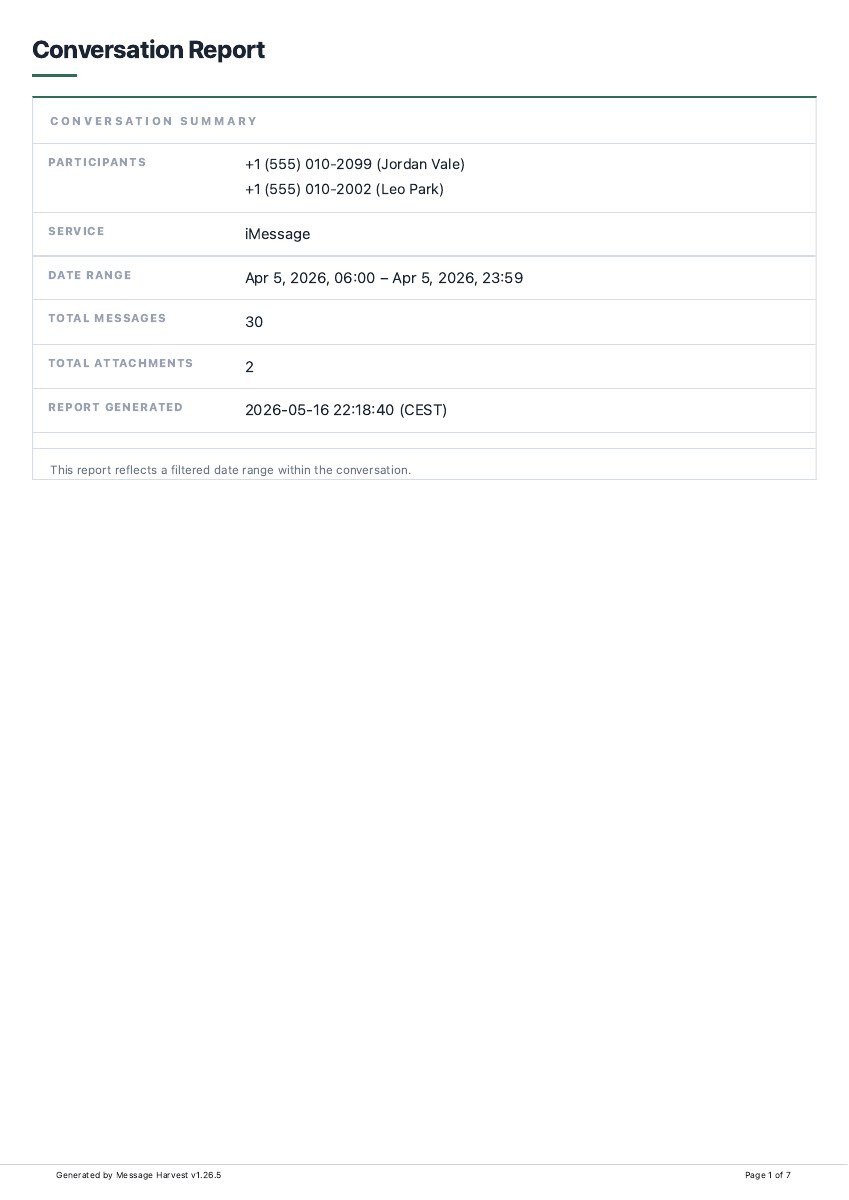
Actual export · fictional demo messages
See the record before you prepare yours.
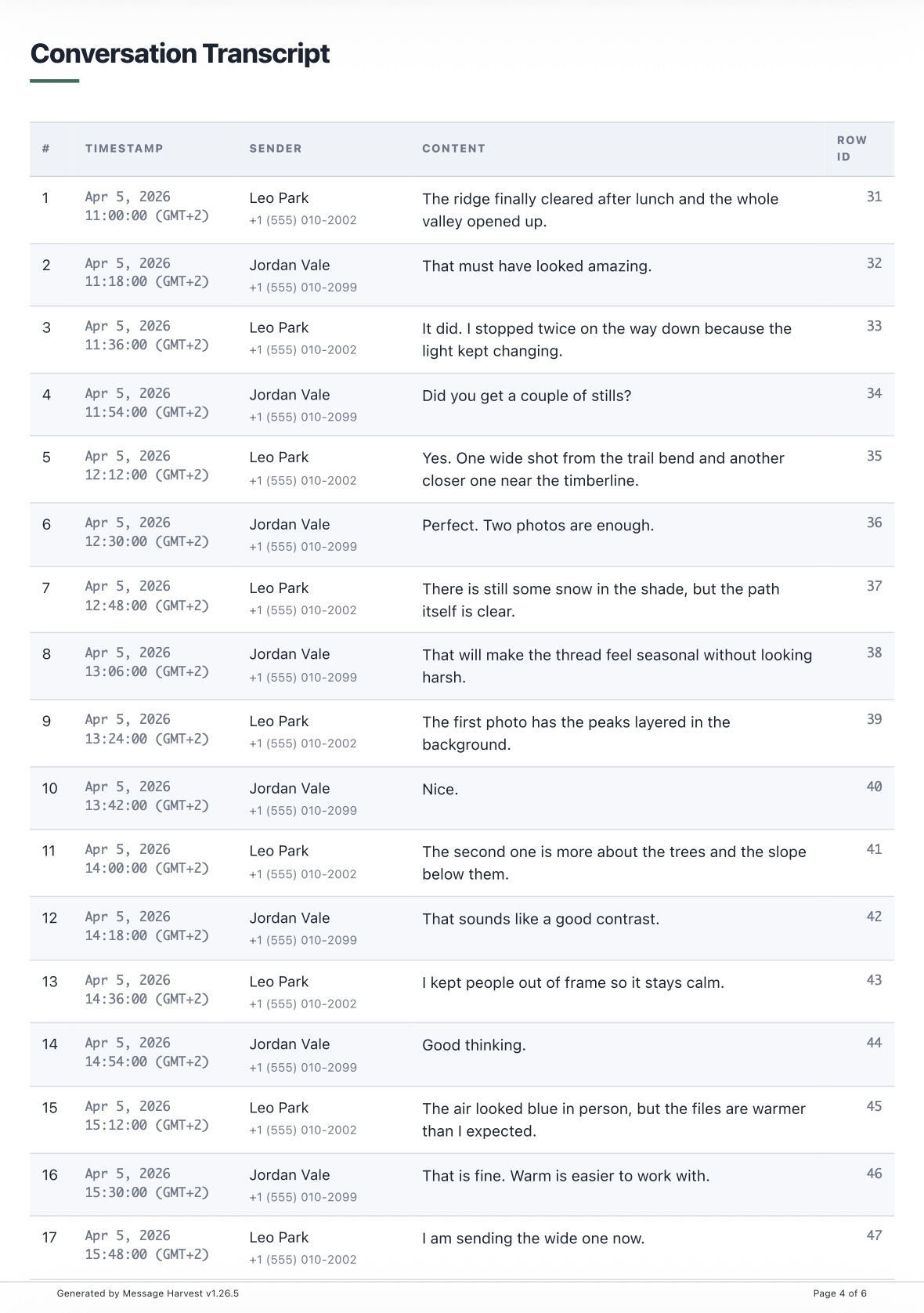
The sample includes a conversation summary, source details, message statistics and a conversation-style transcript.
- Participants and datesFind the phone numbers and selected date range on page 1.
- Messages in contextInspect the conversation and timestamps on pages 4–6.
- Available photosSee how the two retained images appear on page 5.
Demo data. Your export depends on your backup and settings.
Agree on what the recipient needs.
Before preparing a large export, ask your lawyer which conversations, period, file format, and supporting information they need. Requirements depend on the matter and jurisdiction. A PDF may be convenient for reading, while structured exports may help a specialist review.
A few screenshots can leave out dates, participants, or surrounding discussion. An organized export makes those details easier to review, but neither format automatically proves authenticity or completeness.
Preserve the source material separately.
Keep the original device and relevant backups as directed by your lawyer. Work from a copy where appropriate. Record which source backup you used, its date, the export date, and the app version.
The in-app backup workflow may clean up temporary files after import. If you need a complete source backup, preserve a separate Finder backup before using the import workflow. Only process data you are authorized to access.
Prepare a readable export.
- Open the relevant local iPhone backup on an Apple Silicon Mac. The export guide explains setup.
- Choose the conversation and verify the participants.
- Select the agreed date range and retain enough surrounding discussion to explain the exchange.
- Export a PDF with a consistent time zone and the layout requested by the recipient.
- Include available participant identifiers, message timestamps, and supporting attachment information where needed.
- Keep related audio, video, or documents alongside the transcript if they are relevant and present in the backup.
Review the result before handing it over.
Check the participants, time zone, first and last messages, and attachment availability. Tell the recipient about any known gaps. Preserve the original export separately from working copies, annotations, or redactions.
Use PDF for a fixed document, HTML for browsing, XLSX for spreadsheet review, or JSON when a specialist needs structured records. Compare the available formats.
What a file hash can—and cannot—show
MessageHarvest can include an attachment inventory with SHA-256 hashes. Comparing a file with a previously recorded hash can help detect whether that file changed. A hash does not establish who wrote a message, whether the original data was authentic, or whether an export contains the complete conversation.
Questions about preparing the document
Can I include dates, times and phone numbers?
Review the participant details and report time zone, then inspect the saved PDF. The sample shows participant numbers in the summary and timestamps alongside messages. Choose the formal layout when you want sender and timestamp columns.
Can I export only the relevant period?
Yes. Select the date range before exporting and include the surrounding messages needed to understand the exchange. Agree on the scope with your lawyer.
Will photos and attachments appear?
Available photos can appear in the transcript. Keep relevant audio, video or other files alongside the PDF when needed; paper cannot play them. Check for missing attachments in the source backup.
Can I try the layout before paying?
Yes. The free trial lets you preview and export the latest 6 messages per conversation. A one-time license for the source iPhone unlocks full exports.
Will a court accept this PDF?
Acceptance depends on the matter, jurisdiction and supporting evidence. MessageHarvest organizes an export; it does not authenticate the original messages or certify admissibility. Ask your lawyer what to preserve and submit.
Keep going
Export an iMessage conversation
From your first iPhone backup to a finished file. Includes setup, sample reports, and troubleshooting.
Read guide Put it on paperPrint an iPhone conversation
Prepare a readable PDF, check page breaks, and print only the pages you need.
Read guide Family recordsOrganize co-parenting messages
Prepare conversations and a timeline to review with your lawyer.
Read guide