How to Use iMessage Records as Evidence in Family Court

Family court cases often turn on day-to-day communication: schedule changes, pickups, missed visits, support discussions, threats, apologies, and admissions. The issue is rarely whether the messages matter. The issue is whether you can present them clearly, completely, and credibly.

When text evidence is messy, partial, or easy to challenge, it loses force. A stack of screenshots is hard to review, easy to attack, and difficult for a judge, attorney, or guardian ad litem to reference. A structured export from an iPhone backup is far easier to organize and explain.

This guide focuses on the family-court use case specifically: custody disputes, parenting-time conflicts, communication patterns, and other situations where iMessage records can help document what actually happened.

Legal disclaimer: This article is for informational purposes only and does not constitute legal advice. Admissibility rules vary by court and jurisdiction. Always work with your attorney or legal counsel on what to file, how to authenticate it, and what redactions may be required.

Where iMessage Evidence Helps in Family Court

Family court judges often need to understand patterns over time, not just one dramatic message. That is why complete conversation exports can be more useful than isolated screenshots.

  • Custody and parenting-time disputes: missed exchanges, late pickups, refusal to return a child, or repeated schedule changes.
  • Co-parenting communication: hostile language, refusal to cooperate, attempts to bypass agreed procedures, or repeated non-response.
  • Support and expense issues: admissions about unpaid support, medical expenses, childcare costs, or reimbursements.
  • Harassment or intimidation: threats, pressure, abusive language, or attempts to manipulate communication records.
  • Relocation and travel disputes: messages about consent, notice, itineraries, or refusals.
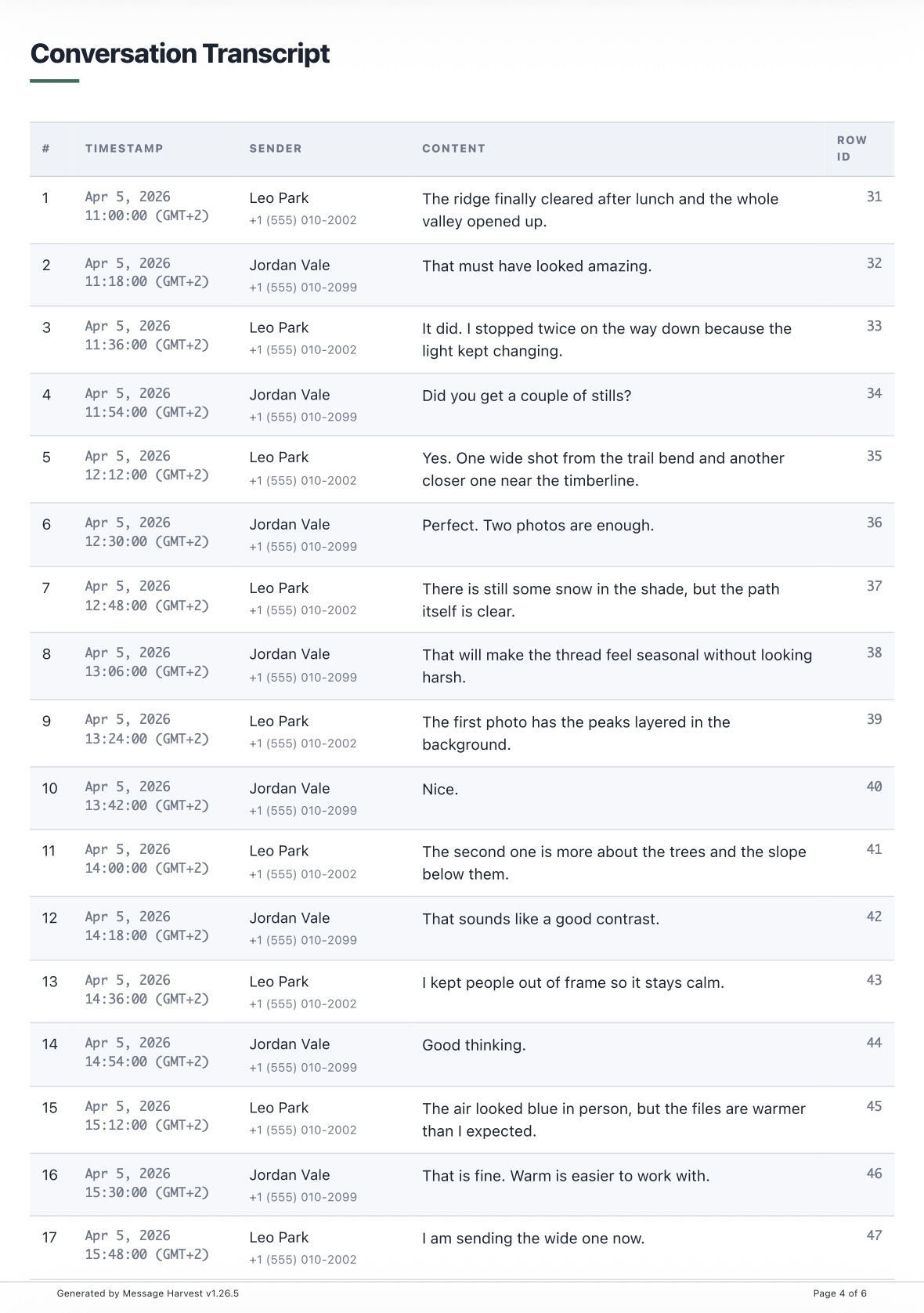
Family-court-ready PDF export produced by MessageHarvest
Example of a clean PDF export you can review with counsel before filing.

Need the PDF, Not Another Screenshot Folder?

MessageHarvest turns an iPhone backup on your Mac into a court-ready export with timestamps, participants, and SHA-256 verification. Download the app and confirm it works with your own backup before you buy.

What Makes Family-Court Message Evidence Stronger

Family court is full of arguments about context. The strongest message evidence reduces ambiguity instead of creating more of it.

  • Complete conversations: not just a few selected screenshots, but the surrounding messages that show tone, escalation, and response.
  • Accurate dates and times: ideally with timezone-aware timestamps so the timing of events is clear.
  • Participant attribution: full phone numbers or Apple IDs are more objective than saved contact names.
  • Chronological order: one paginated document is much easier to cite in declarations, motions, and hearings.
  • Source integrity: documenting which backup was used and preserving file hashes helps support chain-of-custody explanations.

Family-Court Workflow With MessageHarvest

  1. Create or locate the iPhone backup. Use Finder, iTunes, or a direct in-app backup on a supported Mac. If possible, document when the backup was created.
  2. Import it into MessageHarvest. Open the backup locally on your Mac. Encrypted backups are supported.
  3. Find the relevant thread and date range. Narrow the export to the time period that matters for your motion, declaration, or hearing prep.
  4. Export to PDF first. PDF is usually the best starting point for family court because it preserves layout, numbering, and appendix material.
  5. Review with counsel before filing. Confirm completeness, remove anything privileged or unnecessary, and decide whether redactions are needed.

Common Mistakes to Avoid

  • Relying only on screenshots: they are hard to authenticate and often omit context.
  • Cherry-picking messages: partial records invite arguments that the conversation was taken out of context.
  • Ignoring attachments: photos, PDFs, or other shared files may matter just as much as the text itself.
  • Forgetting the timeline: the date range should match the event or allegation you are trying to prove.
  • Waiting until the last minute: give yourself time to review the export and prepare a clean filing set.

Which Export Format Should You Use?

PDF

Best for court filings, attorney review, exhibits, and any situation where you need a fixed, printable record.

HTML

Useful for scrolling through long conversations with counsel on screen before deciding what to file.

XLSX

Helpful when you need to sort, filter, or analyze large volumes of messages across a date range.

Related guides: If you need the general legal workflow, start with the court evidence guide. If you still need help getting the messages off the device side, see the iPhone backup export guide.

Related Guides

Download MessageHarvest

Download the app, verify the conversation, export a sample PDF, and make sure the workflow fits your case before you pay. No subscription. Runs on Apple Silicon Macs with macOS 12+.